Chrome extension · WebMCP
See your WebMCP tools work, the way an agent will use them. Mira tus tools WebMCP funcionar, como las usará un agente.
Open your site, type what a customer would ask, and watch Gemini, Claude, Groq or a local model complete the task using only your page's tools. Every model request and tool call shows up in a debug console. Abre tu web, escribe lo que pediría un cliente y mira cómo Gemini, Claude, Groq o un modelo local completan la tarea usando solo las tools de tu página. Cada llamada al modelo y a cada tool aparece en una consola de debug.
This page registers WebMCP tools too: enable WebMCP Flow here and ask "how do I install it?".Esta página también registra tools WebMCP: activa WebMCP Flow aquí y pregúntale "¿cómo la instalo?".
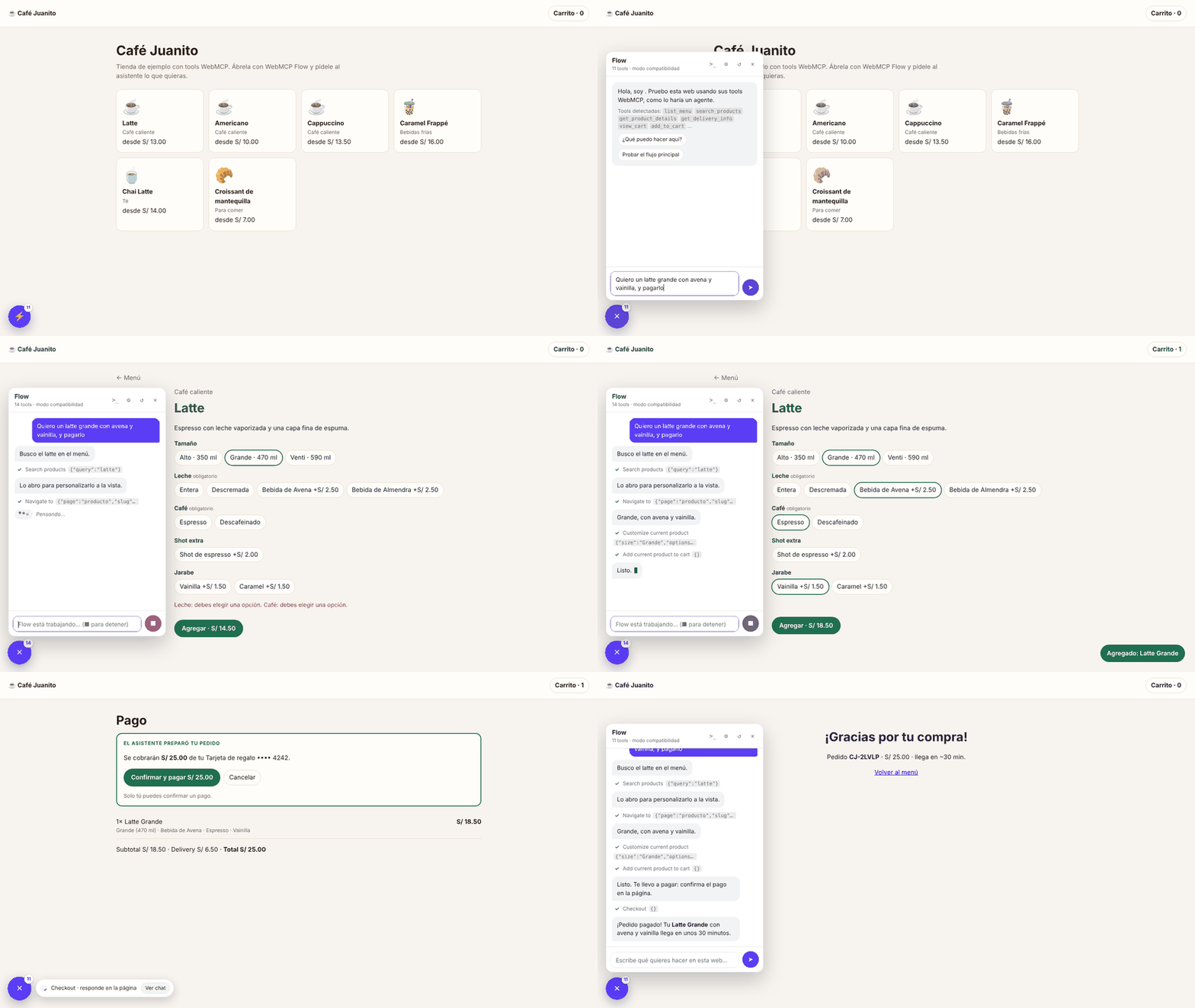
Built for teams that expose WebMCP toolsPara equipos que exponen tools WebMCP
WebMCP lets a page publish tools that AI agents call directly, instead of clicking through screenshots. WebMCP Flow is the quickest way to check those tools as a whole flow, before a real agent does.WebMCP permite que una página publique tools que los agentes de IA llaman directamente, en lugar de navegar con capturas y clics. WebMCP Flow es la forma más rápida de revisar esas tools como un flujo completo, antes de que lo haga un agente real.
Test full flowsPrueba flujos completos
Search, product page, cart, checkout. The conversation survives navigation, and screen-specific tools refresh at every step.Búsqueda, ficha, carrito, pago. La conversación sobrevive a la navegación y las tools de cada pantalla se refrescan en cada paso.
Debug every callDepura cada llamada
Requests, responses, tokens and timings for the model and each tool. Export the trace as JSON for a bug report.Request, response, tokens y tiempos del modelo y de cada tool. Exporta la traza en JSON para reportar un fallo.
Demo it liveHazle una demo en vivo
Show clients or stakeholders an agent using your site, with any model you have a key for, or a local one.Muestra a clientes o al equipo un agente usando tu web, con el modelo del que tengas key o uno local.
InstallInstalar
Chrome Web Store listing coming soon. Until then, load it in Developer mode:La ficha en Chrome Web Store llega pronto. Mientras tanto, cárgala en modo desarrollador:
- Download the latestDescarga el último
webmcp-flow-x.y.z.zipfromdesde Releases and unzip it.y descomprímelo. - OpenAbre
chrome://extensionsand turn on Developer mode.y activa Modo de desarrollador. - Load unpacked → choose the unzipped folder.Cargar descomprimida → elige la carpeta descomprimida.
- Open your site on
localhost, or any other site and click the extension icon → Enable on this site.Abre tu web enlocalhost, u otro sitio y pulsa el ícono → Activar en este sitio.
Pick a modelElige el modelo
Each provider keeps its own key, model and URL. Use a model with tool calling.Cada proveedor guarda su key, modelo y URL. Usa un modelo con tool calling.
| ProviderProveedor | Default modelModelo por defecto |
|---|---|
| Gemini | gemini-3.8-flash |
| Claude | claude-sonnet-5-5 |
| Groq | openai/gpt-oss-120b |
| OpenRouter | openai/gpt-oss-120b |
| LM Studio | the loaded model, no keyel modelo cargado, sin key |
| OtherOtro | any OpenAI-compatible servercualquier servidor compatible con OpenAI |
Prepare your sitePrepara tu web
WebMCP Flow sees every tool your page registers with document.modelContext (or navigator.modelContext). Without Chrome's WebMCP flag it installs a compatible shim, so this works in any recent Chrome.WebMCP Flow ve cada tool que tu página registra con document.modelContext (o navigator.modelContext). Sin el flag de WebMCP de Chrome instala un shim compatible, así que funciona en cualquier Chrome reciente.
const mc = document.modelContext || navigator.modelContext;

mc?.registerTool({
  name: 'search_products',
  description: 'Search products by name.',
  inputSchema: {
    type: 'object',
    properties: { query: { type: 'string' } },
    required: ['query'],
  },
  async execute({ query }) {
    return { results: await api.search(query) };
  },
});- Return readable errors as data (
{ error: "Your cart is empty." }) instead of throwing: the model reads them and corrects itself.Devuelve errores legibles como datos ({ error: "El carrito está vacío." }) en lugar de lanzar excepciones: el modelo los lee y se corrige. - Register screen-specific tools while that screen is open, with an
AbortSignalyou abort on leave.Registra las tools de cada pantalla mientras está abierta, con unAbortSignalque abortas al salir. - Keep payments human: the tool prepares the payment and waits for the person to press the button on your page. WebMCP Flow waits too.Deja los pagos en manos de la persona: la tool prepara el pago y espera a que pulse el botón en tu página. WebMCP Flow también espera.
- See it all in the sample shop (source).Mira todo junto en la tienda de ejemplo (código).
Your keys stay in your browserTus keys se quedan en tu navegador
Keys are stored only in Chrome (chrome.storage.local), edited on the extension's own settings page, never inside the site you test, and sent only to the provider you chose. There is no WebMCP Flow server. Messages and tool results go to that provider under its data terms, so use test data.Las keys se guardan solo en Chrome (chrome.storage.local), se editan en la página de ajustes de la extensión, nunca dentro de la web que pruebas, y se envían solo al proveedor que elegiste. No existe un servidor de WebMCP Flow. Los mensajes y resultados de tools van a ese proveedor bajo sus condiciones: usa datos de prueba.
FAQ
Why does Chrome ask to "read and change your data" on a site?¿Por qué Chrome pide "leer y cambiar tus datos" en un sitio?
That is Chrome's fixed wording for any site access. WebMCP Flow asks only for the site you enable (or for your self-hosted model server) and uses it to show the chat and run that page's own tools. It runs on localhost without asking.Es el texto fijo de Chrome para cualquier acceso a un sitio. WebMCP Flow lo pide solo para el sitio que activas (o para tu servidor de modelos propio) y lo usa para mostrar el chat y ejecutar las tools de esa misma página. En localhost funciona sin pedir nada.
The chat says it found no WebMCP tools.El chat dice que no encontró tools WebMCP.
The page did not call registerTool(), or registers tools only on another screen. If you installed or updated the extension with the page open, reload it. If your page waits for native WebMCP, enable chrome://flags/#enable-webmcp-testing.La página no llamó a registerTool(), o registra sus tools en otra pantalla. Si instalaste o actualizaste la extensión con la página abierta, recárgala. Si tu página espera WebMCP nativo, activa chrome://flags/#enable-webmcp-testing.
Can it pay or confirm things on its own?¿Puede pagar o confirmar cosas por su cuenta?
Only if your tools allow it. WebMCP Flow can only call the tools your page registers. Design sensitive tools to wait for the person; the chat steps aside while they decide.Solo si tus tools lo permiten. WebMCP Flow solo puede llamar a las tools que registra tu página. Diseña las tools sensibles para que esperen a la persona; el chat se aparta mientras decide.
Can I use a local model?¿Puedo usar un modelo local?
Yes: LM Studio, Ollama or any OpenAI-compatible server. Choose LM Studio or "Other" in settings. If the server runs on the same computer, use localhost so Chrome asks for no permission.Sí: LM Studio, Ollama o cualquier servidor compatible con OpenAI. Elige LM Studio u "Otro" en ajustes. Si el servidor corre en la misma computadora, usa localhost y Chrome no pedirá permisos.
Something failed. How do I report it?Algo falló. ¿Cómo lo reporto?
Open the console (>_), click ⤓ Export trace, and attach the file to a bug report. Keys are already masked; remove anything private.Abre la consola (>_), pulsa ⤓ Exportar traza y adjunta el archivo a un reporte de fallo. Las keys ya van enmascaradas; quita lo privado.